The Fastest Way to Generate a Profit & Loss Statement
Are you looking for a quick and efficient way to create a simple profit and loss statement? Use our free income statement generator tool to get your report in minutes.
Temitope Ayegbusi

Are you looking for the fastest way to generate a profit and loss (P&L) statement, without spending hours in spreadsheets or complex accounting software ?
With the free Adam by Tyms income statement generator, you can create, analyze, and download a professional income statement in minutes.
But that’s only half the story. In this guide, you’ll also learn how to read and interpret your P&L statement, what it reveals about your business performance, and how it differs from other financial documents like the balance sheet or cash flow statement.
Key Takeaways
- Create a professional-looking income statement in minutes
- Understand how to read and interpret your income statement
- Use our free income statement generator tool
- Make informed business decisions with accurate financial data
- Save time and reduce errors with our easy-to-use tool
Income Statement vs. Other Financial Reports
1. Balance Sheet vs Income Statement A balance sheet shows what your business owns (assets) and owes (liabilities) at a specific point in time. An income statement (or profit and loss statement) shows revenue, expenses, and profit over a period.
2. Cash Flow Statement vs Income Statement A profit and loss statement reports shows profitability, not cash. A cash flow statement reveals how money actually moves in and out of your business. You can show $5,000 profit on your income statement but still be cash-poor if clients haven’t paid invoices.
3. Tax Returns vs Income Statement Filing your taxes doesn’t give you the same clarity as a P&L. Tax forms are compliance documents; income statements are management tools that help you track margins, expenses, and performance.
4. Budgets or Forecasts vs Income Statement A budget shows what you plan to earn or spend. An income statement shows what actually happened. Comparing the two highlights whether your business is on track.
What Is an Income Statement and Why Does It Matter?
An income statement, also known as a profit and loss statement or P&L sheet, is designed to show your business's revenues and expenses over a specific time frame, typically a month, quarter, or year. Its primary purpose is to determine your company's net income or loss, helping you understand whether your business is operating profitably or not.
Here's a simple breakdown of what an income statement includes:
- Revenues: The total income generated from sales and other business activities.
- Cost of Goods Sold (COGS): The direct costs associated with producing and selling your products or services.
- Operating Expenses: The costs of running your business, such as salaries, rent, and marketing expenses.
- Net Income: The profit remaining after deducting all expenses from revenues.
As Warren Buffett once said, "Price is what you pay. Value is what you get." Understanding your income statement helps you grasp the value of your business operations.
The Critical Components of an Income Statement
To create an effective income statement, you need to understand its critical components. Here’s a deeper look at the key components:
Revenue and Sales
Revenue, or sales, is the total amount of money earned from your business operations before any expenses are deducted. You see it at the top line of your income statement.
For a small business, revenue can come from various sources, such as product sales, service fees, or consulting income. Accurate revenue tracking is crucial for understanding your business's financial health.
Cost of Goods Sold (COGS)
The Cost of Goods Sold (COGS) includes the direct costs associated with producing and selling your products or services.
This can include materials, labor, and overhead costs. COGS is subtracted from revenue to calculate gross profit. For example, if you sell handmade products, COGS would include the cost of materials and labor used to create those products.
Operating Expenses
Operating expenses are the costs associated with running your business that are not directly related to the production of goods or services. These can include rent, utilities, marketing expenses, and salaries.
Operating expenses are subtracted from gross profit to calculate operating income. Keeping operating expenses under control is vital for maintaining profitability.
Net Income Calculation
Net income is calculated by subtracting all expenses, including Cost of Goods sold, operating expenses, and taxes, from your total revenue. It's always at the bottom line of your income statement and it represents your business's overall profitability.
A positive net income indicates that your business is profitable, while a negative net income indicates a loss.
In summary, the key components of an income statement are:
- Revenue and Sales
- Cost of Goods Sold (COGS)
- Operating Expenses
- Net Income
Understanding these components is essential for creating an accurate and informative income statement that helps you make informed business decisions.
Traditional Methods of Creating Income Statements
Income statement preparation has long been accomplished through manual spreadsheet creation or by utilizing accounting software, each with its own set of challenges. You have likely used one of these methods to create your P&L sheet.
Manual Spreadsheet Creation
Manual spreadsheet creation involves setting up a template in a spreadsheet program like Microsoft Excel, where you input your financial data to generate an income statement. This method provides a high degree of control over the layout and calculations. The problem with manual processing
Time Investment Required
Creating an income statement manually can be very time-consuming, especially for businesses with complex financial situations. You need to ensure that all data is accurately entered and that calculations are correct, which can take several hours or even days.
Common Spreadsheet Errors
Manual spreadsheet creation is prone to errors such as incorrect formulas, misplaced data, or overlooked entries. These mistakes can lead to inaccurate financial reporting, which can have serious consequences for your business decisions.
How to Generate Financial Statements in Minutes With Adam by Tyms
Inside Adam by Tyms, you can instantly access every key financial statement your business needs , from your Profit and Loss Statement and Balance Sheet to your Cash Flow Report and Trial Balance. Each report is automatically generated, accurate, and formatted for easy review or sharing.
Step 1: Upload Your Bank Statement
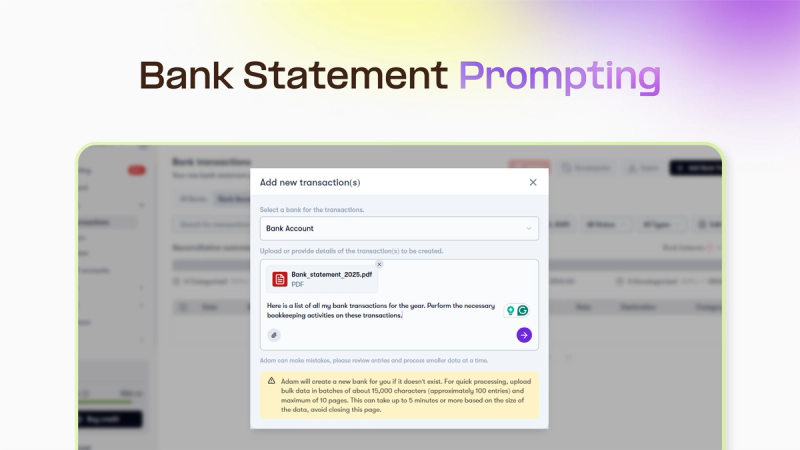
Simply upload your bank statement (PDF, CSV, or Excel). Adam’s AI reads and organizes your transaction data automatically, no formatting, cleaning, or coding required.
Step 2: Adam Auto-Categorizes Your Transactions
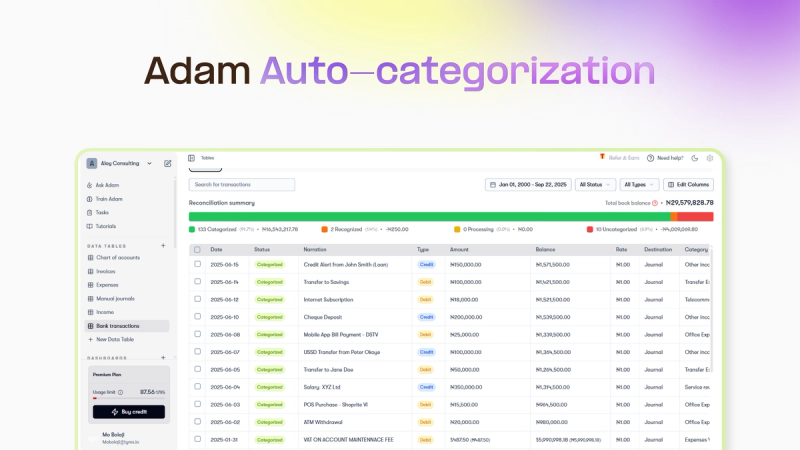
Once uploaded, Adam instantly sorts income and expenses, detects duplicates, and applies smart accounting categorizations (sales, payroll, rent, subscriptions, etc.). No need to understand charts of accounts, every transaction is ready for reporting in seconds.
Step 3: Generate Reports Instantly
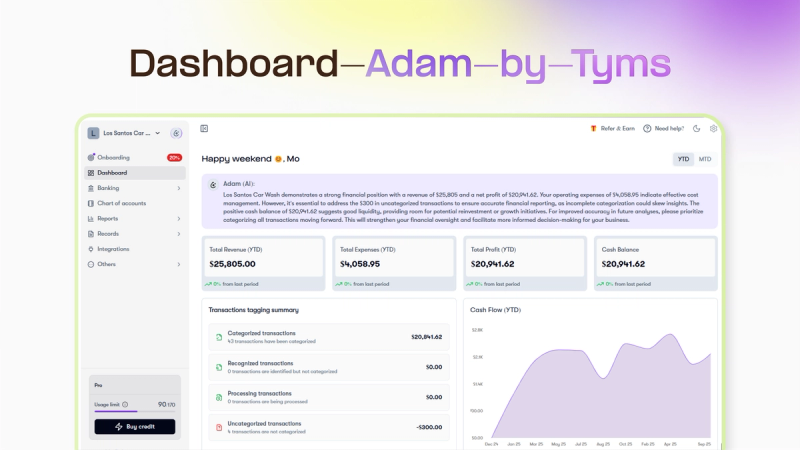
Go to Reports and generate your Profit and Loss Statement, Income Statement, Balance Sheet, Cash Flow Report, and more, all formatted, accurate, and downloadable.
No formulas. No spreadsheets. Just clean, professional financial statements created in minutes.
Free Income Statement Generator Tool
Streamlining financial reporting is now easier than ever with our free tool. The income statement generator available for use. Generate your income Statement here
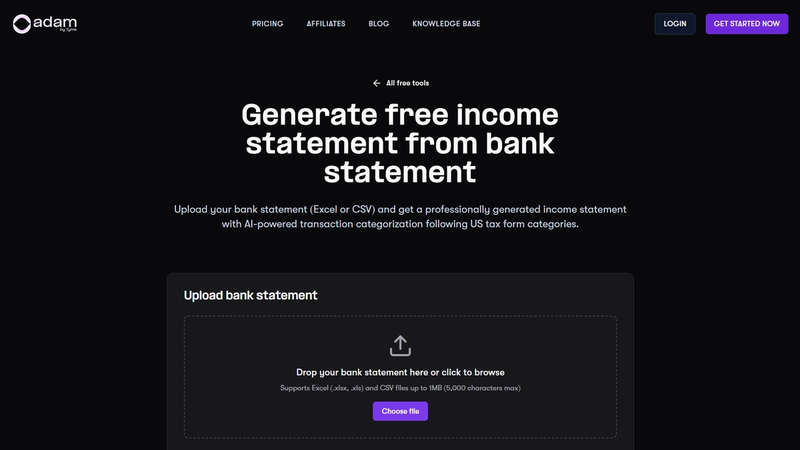
Overview of the Income Statement Generator Tool
The Adam by tyms income statement generator is a user-friendly platform that automates the process of creating income statements. By uploading your bank statement , the tool generates a comprehensive and accurate income statement, saving you time and reducing the risk of errors.
This tool is particularly beneficial for businesses looking to streamline their financial reporting processes.
With the Adam by Tyms income statement generator tool, you can quickly produce a professional-grade income statement that can be used for internal analysis, investor presentations, or lender requirements, sent directly to your mail.
Analyzing Your Income Statement: Key Metrics to Track
Once you've generated your income statement, the next crucial step is to analyze it to gain valuable insights into your business's financial health. This analysis will help you understand your company's profitability, identify areas for improvement, and make informed decisions about future investments.
Gross Profit Margin
Your gross profit margin is a critical metric that indicates the difference between your revenue and the cost of goods sold. It's calculated by dividing your gross profit by revenue and multiplying by 100.
A higher gross profit margin suggests that your business is efficiently managing its production costs. For instance, if your gross profit is $50,000 and your revenue is $100,000, your gross profit margin would be 50%.
This means that for every dollar sold, you're retaining 50 cents as gross profit.
Operating Profit Margin
The operating profit margin takes your analysis a step further by considering your operating expenses. It's calculated by dividing your operating income by revenue and multiplying by 100.
This metric provides insight into how well you're managing your operational costs. A healthy operating profit margin indicates that your business is not only producing goods or services at a reasonable cost but also controlling its overhead expenses effectively.
Net Profit Margin
Your net profit margin is perhaps the most comprehensive metric, as it accounts for all expenses, including taxes and interest. It's calculated by dividing your net income by revenue and multiplying by 100.
This figure gives you a clear picture of your bottom line and overall profitability. A strong net profit margin suggests that your business is in good financial health and capable of generating profits after all expenses are considered.
Year-Over-Year Comparisons
Analyzing your income statement over multiple periods allows you to identify trends and patterns in your financial performance. By comparing year-over-year data, you can spot areas of improvement or concern.
For example, if your revenue has increased by 10% from one year to the next, but your net profit margin has decreased, it may indicate rising costs or inefficiencies that need to be addressed.
By focusing on these key metrics and comparing them over time, you can gain a deeper understanding of your business's financial performance and make more informed decisions to drive growth and profitability.
FAQ
What is the purpose of an income statement?
The primary purpose of an income statement is to provide a summary of a company's revenues and expenses over a specific period, helping you understand its financial performance and make informed decisions.
How often should I generate an income statement?
You should generate an income statement at least quarterly, but monthly statements are ideal for closely monitoring your business's financial health and making timely adjustments.
What is the difference between a balance sheet and an income statement?
A balance sheet provides a snapshot of your company's financial position at a specific point in time, while an income statement shows its revenues and expenses over a period, helping you understand its financial performance.
How do I analyze my income statement?
To analyze your income statement, focus on key metrics such as gross profit margin, operating profit margin, and net profit margin, and compare them over time to identify trends and areas for improvement.
Can I use the income statement generator tool for my small business?
Yes, the income statement generator tool is suitable for businesses of all sizes, including small businesses, and can help you create professional-looking income statements quickly and efficiently.
Is my financial data secure when using the income statement generator tool?
Yes, the income statement generator tool, prioritizes data security and protection, ensuring that your financial information is safe and secure.
How do I customize my income statement for different needs?
You can customize your income statement by adjusting the frequency (monthly, quarterly, or annually), categorizing expenses, and comparing data from previous months or years to suit your business needs. To do this, sign up on Adam by Tyms and create an account.
What are some common mistakes to avoid when creating an income statement?
Common mistakes to avoid include categorization errors, timing and recognition issues, and reconciliation problems, which can be minimized by using a reliable income statement generator tool and double-checking your data.
You can also read:
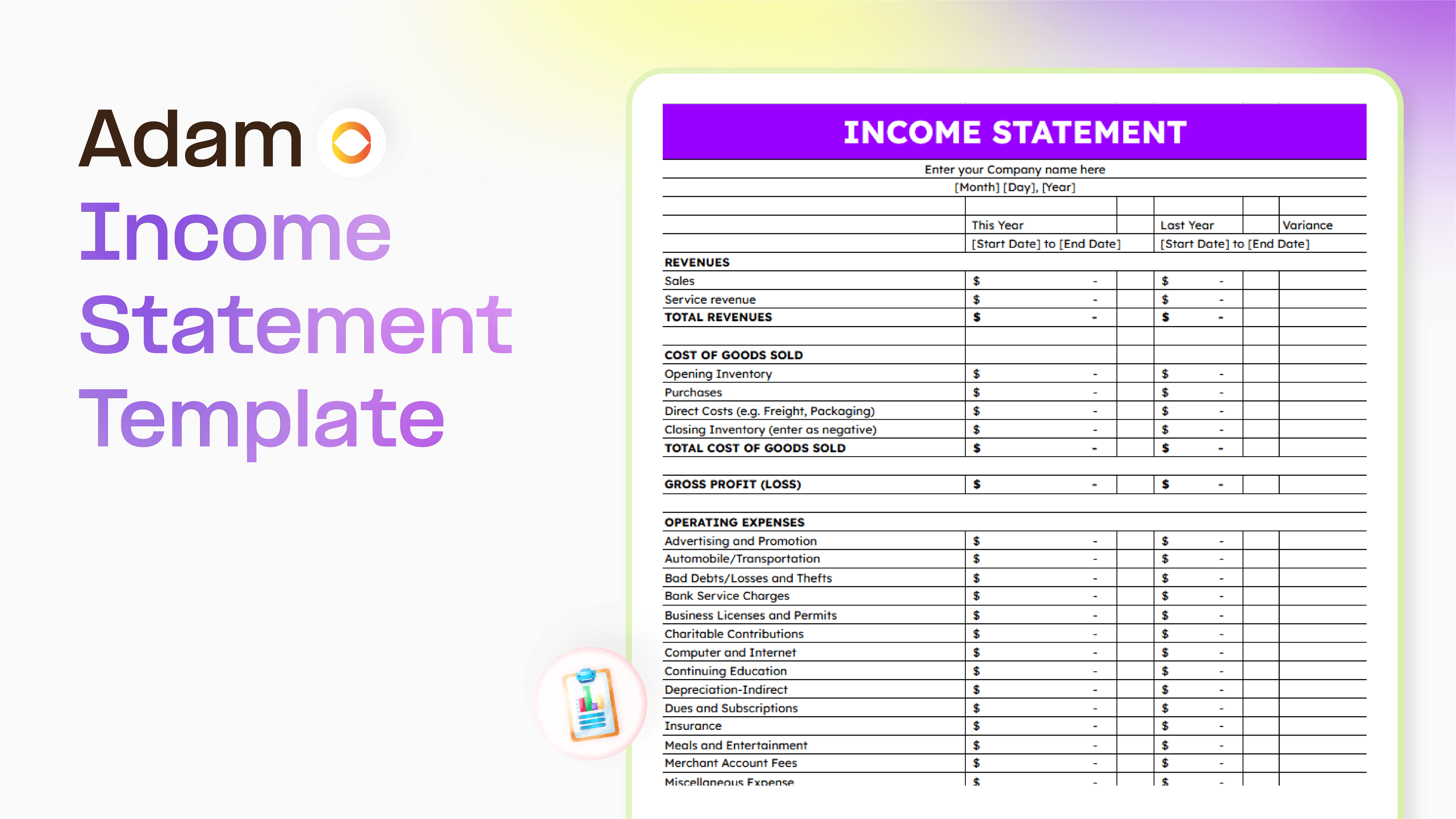
Master your finance with a free Excel Income Statement Template
Using an Excel income statement template isn't just about filling in numbers; it's about getting a clearer picture of how your business is actually doing.
Temitope Ayegbusi
Jan 30, 2026

Accounting Automation Software Features That Actually Matter (For Small Businesses)
This guide breaks down accounting automation software features that truly matter, explains how popular tools approach automation, and helps small business owners understand what to look for before choosing the wrong solution.
Temitope Ayegbusi
Jan 22, 2026