Master your finance with a free Excel Income Statement Template
Using an Excel income statement template isn't just about filling in numbers; it's about getting a clearer picture of how your business is actually doing.
Temitope Ayegbusi
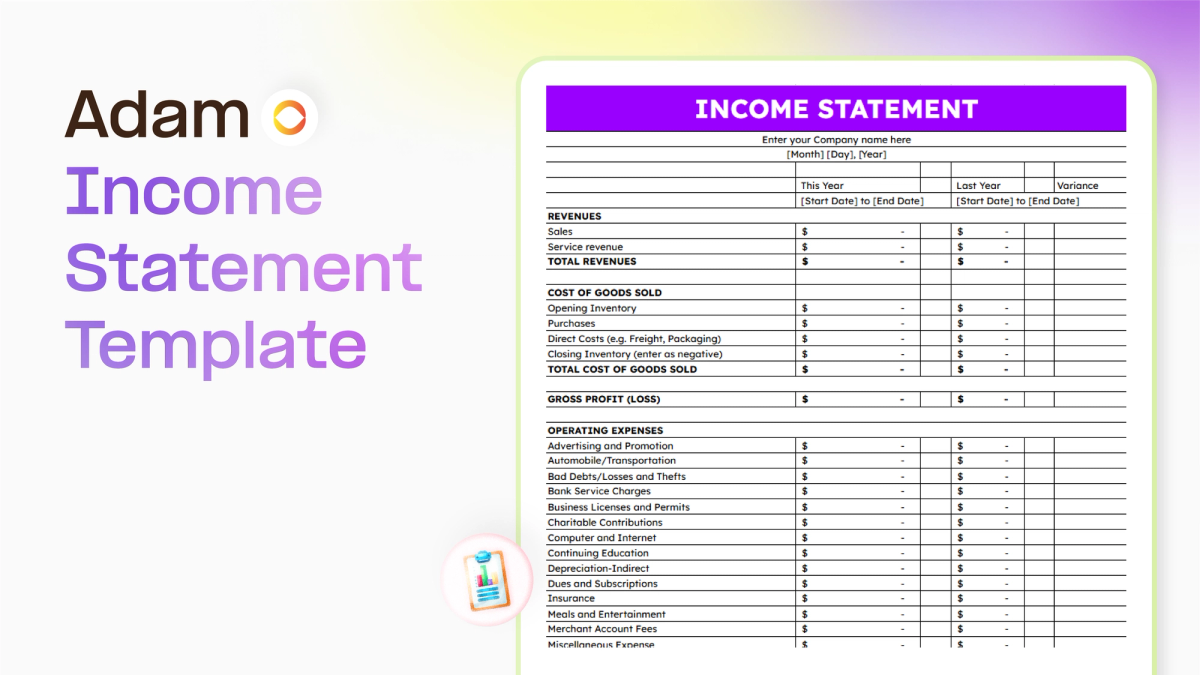
Running a business can feel like a lot, right? You're juggling sales, customers, and all that day-to-day stuff. But what about the money side of things? It’s easy to let that slide, but knowing where your money is going is super important. That’s where a good old excel income statement template comes in handy. It’s not as scary as it sounds, and it can really help you get a grip on your business's financial health.
Key Takeaways
- An income statement shows your business's revenue and expenses over a set time, helping you see if you made a profit or a loss.
- Using a free excel income statement template makes tracking money in and out much simpler and more organized.
- Templates help you spot where you can save money by identifying unnecessary costs.
- By entering your transactions, the template automatically calculates key figures, making financial analysis easier.
- Understanding your financial performance helps you make smarter decisions for your business's future.
Understanding Your Business Finances With An Excel Income Statement Template
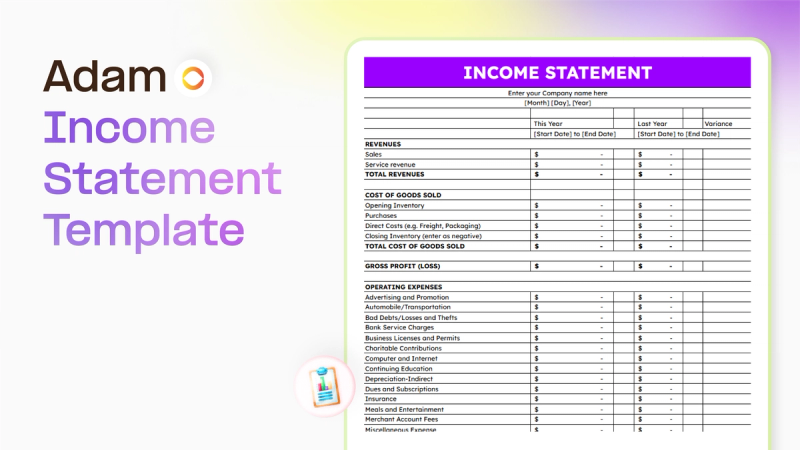
What Is An Income Statement?
Think of an income statement as a report card for your business's financial performance over a specific period, like a month, a quarter, or a year. It shows you exactly how much money you brought in (revenue) and how much you spent (expenses).
The bottom line tells you if your business made a profit or took a loss. It's also sometimes called a Profit and Loss (P&L) statement or a statement of earnings. Unlike a balance sheet, which is a snapshot at one moment, the income statement shows activity over time, giving you a dynamic view of your business's financial health.
Why Use An Income Statement Template?
Running a business means keeping a close eye on your money. Trying to track everything manually can get messy fast. That's where a template comes in handy. It gives you a structured way to record your income and expenses, making it easier to see where your money is going. This organized approach helps you:
- Spot trends: See if your sales are growing or if certain expenses are creeping up.
- Make smarter choices: Understand your profitability to decide where to invest more or where to cut back.
- Stay organized for taxes: Having clear records makes tax season much less stressful.
Using a template takes the guesswork out of financial tracking. It's like having a built-in assistant that keeps your numbers straight, so you can focus on running your business.
Key Components Of An Income Statement
An income statement typically breaks down into a few main parts:
- Revenue: This is all the money your business earns from its primary activities, like selling products or providing services. It's the top line of your statement.
- Cost of Goods Sold (COGS): If you sell physical products, this includes the direct costs associated with producing them, like materials and direct labor. For service businesses, this might be the direct costs of delivering that service.
- Gross Profit: This is your revenue minus your COGS. It shows how much profit you make from selling your goods or services before considering other operating expenses.
- Operating Expenses: These are the costs of running your business day-to-day, such as rent, salaries, marketing, utilities, and supplies. They are separate from the direct costs of producing your goods or services.
- Operating Income (or Loss): This is your gross profit minus your operating expenses. It reflects the profitability of your core business operations.
- Other Income/Expenses: This section includes income or expenses that aren't part of your main business operations, like interest earned on investments or interest paid on loans.
- Net Income (or Loss): This is the final number. It's your operating income (plus or minus other income/expenses) after taxes. This is the true profit or loss of your business for the period.
Streamlining Financial Management With An Excel Income Statement Template
Using an Excel income statement template isn't just about filling in numbers; it's about getting a clearer picture of how your business is actually doing.
Think of it as your business's health check-up. It helps you keep tabs on where your money is coming from and where it's going, which is pretty important if you want to stay afloat and grow. Here are a few importance to the free excel Income Statement Template.
Systematic Tracking Of Revenue And Expenses
One of the biggest wins from using a template is how it forces you to be organized. You'll list out all your income sources, whether it's sales, services, or other earnings.
On the flip side, you'll detail every expense, from the big stuff like rent and salaries to the smaller things like office supplies. This systematic approach means you're less likely to miss anything, and you get a real sense of your spending habits.
Here’s a look at what gets tracked:
- Revenue Streams: All money coming in from sales, services, subscriptions, etc.
- Cost of Goods Sold (COGS): Direct costs tied to producing what you sell.
- Operating Expenses: Costs to run the business daily, like rent, utilities, marketing, and salaries.
- Non-Operating Expenses: Costs not related to core operations, such as interest on loans.
Keeping a close eye on these categories helps you understand what's driving your profits and where your money is being spent. It’s the foundation for making smarter financial moves.
Generating Professional Financial Reports
Manually creating financial reports can be a headache, and frankly, they often don't look very polished. An Excel template, especially one with built-in formulas, does a lot of the heavy lifting for you.
Once you input your data, it automatically calculates key figures like gross profit and net income. This means you get professional-looking reports without needing to be an accounting whiz. These reports are vital for understanding your business's performance and can be shared with partners, lenders, or investors.
Saving Money Through Cost Optimization
This is where the template really pays for itself. By clearly seeing all your expenses laid out, you can start to spot areas where you might be overspending.
Maybe that subscription service isn't being used as much as you thought, or perhaps there's a more cost-effective supplier for your materials. Identifying these unnecessary expenses is the first step to cutting them.
The template helps you pinpoint these opportunities, allowing you to reallocate funds to more productive areas of your business or simply improve your bottom line.
Getting Started With Your Free Excel Income Statement Template
So, you've got your hands on a free Excel income statement template. That's a great first step! Now, let's get it set up so it actually starts working for you. It's not as complicated as it might sound, honestly. Think of it like setting up a new tool – you just need to know where the pieces go.
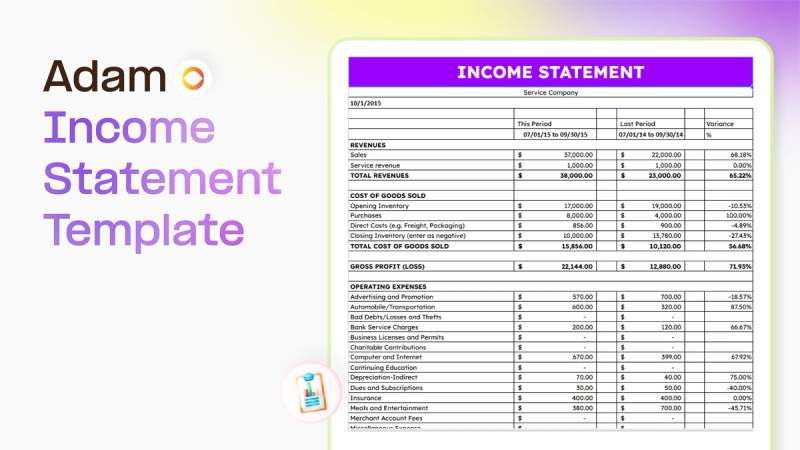
Downloading and Setting Up The Template
First things first, you need to download the template file. Once it's on your computer, open it up in Excel. You'll probably see a few different sheets or tabs at the bottom. Take a moment to just look around.
The goal here is to make this template fit your specific business. Don't be afraid to click around and see what's there. Most templates come with some example data, which is helpful for seeing how things work, but you'll want to clear that out later.
Populating Your Chart of Accounts
This is probably the most important part of setting up. Your chart of accounts is basically a list of all the different types of money your business deals with. Think of it as your business's financial vocabulary.
You'll need to list out all your income sources – like sales, service fees, or interest earned. Then, you'll list all your expenses. This includes things like rent, salaries, supplies, marketing costs, and so on.
Here’s a basic idea of what your chart of accounts might look like:
Make sure your categories are specific enough to be useful but not so detailed that it becomes overwhelming. The template have a dedicated tab for this. Fill it in carefully; this list is what helps the template sort all your transactions correctly.
Entering Business Transactions
Once your chart of accounts is set up, you can start entering your actual business activity. This means recording every sale you make and every expense you pay. For each transaction, you'll typically need to enter:
- The date it happened.
- A brief description (e.g., "Office Supplies", "Client Payment").
- The amount of money involved.
- Which category from your chart of accounts it belongs to.
The key is consistency. If you record every single transaction, no matter how small, your income statement will give you a true picture of your business's financial health. It might feel tedious at first, but the more diligent you are now, the more accurate your reports will be later.
Don't worry if you make a mistake; you can usually go back and edit entries. The template should automatically update the totals as you add information, which is a huge time-saver.
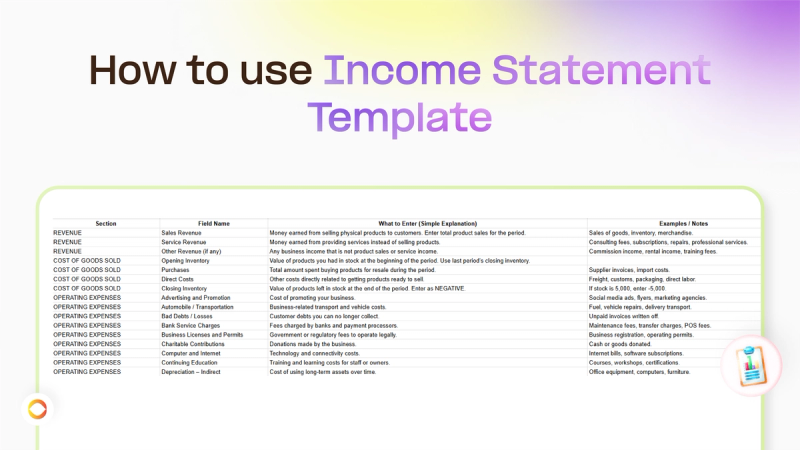
Just keep plugging away, and soon you'll have a solid record of your business's financial movements. In the free Excel Income Statement Template, a how to use guide is made available for you, as seen below.
Download your Excel Income Statement Template
Leveraging Your Excel Income Statement Template For Growth
So, you've got your income statement template set up and you're plugging in all those numbers. That's great! But what do you actually do with it? This isn't just about filling boxes; it's about using that data to make your business smarter and stronger. Think of it as your business's report card, but way more useful. What decisions can you make with your income statement ?
Analyzing Profitability and Performance
This is where the magic happens. Your income statement template breaks down exactly where your money is coming from and where it's going. You can see your gross profit – that's what's left after you subtract the direct costs of making or selling your product.
Then, you subtract all your other operating expenses (like rent, salaries, marketing) to get your net profit.
Seeing these numbers clearly helps you understand if your business is actually making money and how efficiently it's operating. Are your sales high but your profit low? Maybe your costs are too high, or your pricing needs a look.
Making Informed Business Decisions
Numbers don't lie, and your income statement is packed with them. Instead of guessing, you can make decisions based on facts. For example, if you see that a particular service or product line has a really high profit margin, you might decide to push that more.
On the flip side, if an expense category is eating up a huge chunk of your revenue with little return, it might be time to cut back or find a cheaper alternative.
Here are some questions your income statement can help answer:
- Is our pricing strategy working?
- Which products or services are our biggest money-makers?
- Are our operating costs under control?
- Can we afford to hire new staff or invest in new equipment?
- Is our marketing spend actually bringing in more revenue than it costs?
Comparing Financial Periods
One of the most powerful uses of your income statement template is comparing different time frames. You can look at this month versus last month, this quarter versus the same quarter last year, or even year-over-year. This helps you spot trends.
Is your revenue growing steadily? Are expenses creeping up faster than sales? This kind of comparison is key to understanding your business's trajectory and making adjustments before small issues become big problems.
Tracking your finances over time allows you to see patterns you might otherwise miss. It's like looking at a map versus just seeing your current location; you get a sense of direction and progress.
Choosing The Right Income Statement Format
When you're looking at your business's financial health, how you present that information really matters. The income statement, often called the profit and loss (P&L) statement, is key for seeing if you're making money over a period. But not all income statements are created equal.
There are two main ways to set them up: single-step and multi-step. Choosing the right format helps you understand your business's performance more clearly.
Single-Step Versus Multi-Step Statements
The main difference between these two formats comes down to detail. A single-step income statement is pretty straightforward. It takes all your revenues and subtracts all your expenses in one go to get your net income. Think of it like this: Total Revenue - Total Expenses = Net Income. This format is usually best for smaller businesses or those with simpler operations because it's quick to read and understand.
On the other hand, a multi-step income statement breaks things down more. It separates operating revenues and expenses from non-operating ones. This gives you a look at things like your gross profit (revenue minus the cost of goods sold) and your operating income before you even get to interest and taxes.
This detailed view is super helpful for larger companies or those with more complex operations, like manufacturing or distribution, as it highlights different aspects of profitability.
Here’s a quick look at the differences:
- Single-Step: Simple, one calculation, good for small businesses.
- Multi-Step: Detailed, separates operating and non-operating items, shows gross profit and operating income, better for complex businesses.
When To Use Each Statement Type
So, which one should you use? It really depends on your business. If you're a small shop or a service provider with straightforward income and expenses, a single-step statement might be all you need. It gets straight to the point: did you make money or not?
For businesses with inventory, manufacturing processes, or multiple revenue streams and expense categories, the multi-step format is generally more informative. It allows for a deeper analysis of where profits are coming from and where costs are accumulating.
If your business involves selling products, you'll likely have a cost of goods sold (COGS) to account for. A multi-step statement clearly shows this figure, giving you insight into your product's profitability.
You can find a variety of downloadable Excel accounting templates that offer both formats, so you can pick the one that fits your needs best. Ultimately, the goal is to have a financial report that makes sense for your specific business situation and helps you make smart decisions.
Beyond The Template: Complementary Financial Tools
So, you've got your income statement template humming along, tracking all those important numbers. That's fantastic! But honestly, a single template is just one piece of the financial puzzle.
To really get a grip on your business's money situation and plan for the future, you'll want to look at a few other helpful tools. Think of them as your financial toolkit, each serving a specific purpose.
Budgeting and Variance Analysis
An income statement shows you what happened. A budget, on the other hand, tells you what you plan to happen. Creating a budget is like drawing a map for your business's money. You set targets for income and expenses.
Then, you use your income statement (and other data) to see how your actual results stack up against those targets. This comparison is called variance analysis. It's super useful for spotting where you're overspending or where you might be earning more than expected.
Here’s a quick look at what you might track:
- Projected Revenue: What you expect to earn.
- Actual Revenue: What you actually earned.
- Projected Expenses: What you plan to spend.
- Actual Expenses: What you actually spent.
- Variance: The difference between projected and actual figures.
Spotting these differences helps you understand why things didn't go exactly as planned. Maybe your marketing costs were higher than anticipated, or perhaps a new product line is bringing in more cash than you thought. This information is gold for making adjustments.
Break-Even Point Calculations
Ever wonder how much you need to sell just to cover all your costs? That's where the break-even point comes in. It's the magic number where your total revenue equals your total expenses – you're not making a profit, but you're not losing money either. Knowing this point is pretty important.
Calculating it usually involves looking at:
- Fixed Costs: Expenses that stay the same regardless of sales volume (like rent or salaries).
- Variable Costs: Expenses that change with sales volume (like raw materials or sales commissions).
- Selling Price Per Unit: How much you charge for each item.
Understanding your break-even point helps you set realistic sales goals and pricing strategies. It's a key metric for understanding your business's financial viability. Use our free AI break even calculator
Loan Management and Business Planning
If your business has loans, keeping track of them is a big deal. A loan amortization schedule is a simple but effective tool. It lays out exactly how much of each payment goes towards the principal and how much goes towards interest, showing your remaining balance over time. This helps you see the true cost of borrowing and plan your repayment strategy.
Beyond just tracking loans, these tools often tie into broader business planning. When you're thinking about the future – maybe expanding, taking on new projects, or seeking investment – having clear financial data from your income statement, budget, and loan schedules is vital. It forms the backbone of a solid business plan, showing potential investors or lenders that you've got your finances well in hand.
AI Income Statement Generator
AI Income Statement Generator free tool is widely available for anyone who wants to avoid manual processes. You can try it out for free. All you will need is a bank statement uploaded to Adam by Tyms free Income statement Generator tool, and you'll get a well formatted structured income statement.
Use the AI Income Statement Generator
Wrapping It Up
So there you have it. Using a free Excel income statement template is a pretty straightforward way to get a handle on your business's money. It helps you see where your money is coming from and where it's going, which is pretty important for making smart choices.
Whether you're just starting out or have been running things for a while, this kind of tool can really make a difference. Don't let the numbers scare you; grab that template and start tracking your finances today. You'll be glad you did.
Download your Excel Income Statement Template.
Frequently Asked Questions
What exactly is an income statement?
Think of an income statement as a report card for your business over a certain time, like a month or a year. It shows how much money you made (your income) and how much money you spent (your expenses). At the end, it tells you if your business made a profit or had a loss.
Why should I use a template for my income statement?
Using a template is like having a guide. It helps you organize all your money details without you having to figure out the exact layout. This makes it quicker to create your report, helps you understand your business's money situation better, and can even help you spot ways to save money.
What are the main parts of an income statement?
The main parts are your 'Revenue' (all the money that came into your business from sales) and your 'Expenses' (all the money you spent to run your business). By subtracting your expenses from your revenue, you find out your profit or loss.
Can this template help me make better business choices?
Absolutely! By clearly seeing your income and expenses, you can figure out which parts of your business are making the most money and where you might be spending too much. This information helps you decide where to invest more, where to cut back, and how to plan for the future.
What's the difference between a single-step and a multi-step income statement?
A single-step statement is simple: it just subtracts all expenses from all income to get the final profit. A multi-step statement breaks things down more, showing your 'gross profit' (profit from just selling your goods or services) before showing your total profit after all other costs.
Do I really need an income statement if I'm a small business owner?
Yes, even for small businesses, it's super helpful! It's not just about taxes. It helps you understand if your business is healthy, where your money is going, and if you're on the right track to reach your goals. It's a key tool for smart business management.
You can also read:

Accounting Automation Software Features That Actually Matter (For Small Businesses)
This guide breaks down accounting automation software features that truly matter, explains how popular tools approach automation, and helps small business owners understand what to look for before choosing the wrong solution.
Temitope Ayegbusi
Jan 22, 2026

Why Your Profit Doesn’t Match Your Bank Balance (And How to Fix It)
Why doesn’t my profit match my bank balance? Here is a common question amongst small business owners. The answer is simple, let's find out
Temitope Ayegbusi
Jan 22, 2026