Best Farm Accounting Software for US Farmers (2026 Comparison)
Compare the best farm accounting software in 2025 for US farmers. See features, use cases, and why Adam by Tyms is the fastest option for automated bookkeeping.
Temitope Ayegbusi
If you’re a US farmer trying to choose the best accounting software in 2025, the decision can feel overwhelming. Some tools focus on traditional bookkeeping, others on farm management, and very few are built to automate your finances without spreadsheets or manual work.
This comparison breaks down the best farm accounting software for US farmers, based on automation, reporting, ease of use, and suitability for small to mid-sized farms. You’ll see which tools are best for different farm types, and which option helps you get audit-ready financials in minutes, not weeks.
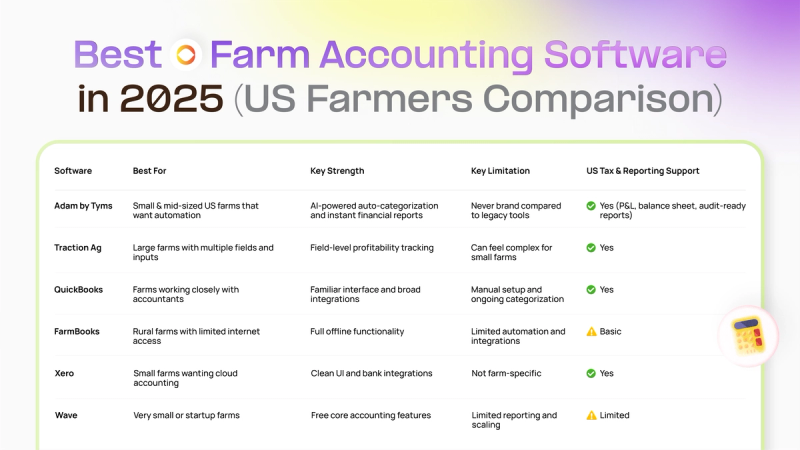
Best Farm Accounting Software in 2025 (Quick Comparison)
Adam by Tyms — Best Overall for US Farmers
- Best for: Small and mid-sized farms in the United States and other regions
- Key strength: Automated bookkeeping with instant, audit-ready financial reports
- Key limitation: Newer product compared to long-established accounting tools
- US tax & reporting support: Yes (profit and loss, balance sheet, cash flow)
Traction Ag — Best for Large, Complex Farm Operations
- Best for: Large farms managing multiple fields and detailed inputs
- Key strength: Field-level profitability and advanced farm reporting
- Key limitation: Can feel complex and time-consuming for small farms
- US tax & reporting support: Yes
QuickBooks — Best for Accountant-Led Farm Bookkeeping
- Best for: Farms that work closely with accountants or bookkeepers
- Key strength: Familiar accounting system with wide professional adoption
- Key limitation: Requires manual setup and ongoing transaction categorization
- US tax & reporting support: Yes
FarmBooks — Best for Offline Farm Accounting
- Best for: Farms in rural areas with limited or unreliable internet access
- Key strength: Fully offline accounting functionality
- Key limitation: Limited automation and modern integrations
- US tax & reporting support: Basic
Xero — Best Cloud-Based Option for Small Farms
- Best for: Small farms looking for simple, cloud-based accounting
- Key strength: Clean interface and strong bank integrations
- Key limitation: Not designed specifically for farm operations
- US tax & reporting support: Yes
Wave — Best Free Accounting Software for Very Small Farms
- Best for: Startup or very small farms with basic accounting needs
- Key strength: Free core accounting features
- Key limitation: Limited reporting and scalability as farms grow
- US tax & reporting support: Limited.
Quick takeaway: If you want the fastest way to automate farm bookkeeping and generate clear, audit-ready financial reports, Adam by Tyms is the best farm accounting software for US farmers in 2025.
Best Overall Farm Accounting Software for US Farmers — Adam by Tyms
Best for: Small to mid-sized US farms that want automated bookkeeping, clear financial reports, and minimal manual work.
Adam by Tyms is designed for farmers who don’t want to spend evenings sorting transactions or fixing spreadsheet errors.
Instead of relying on manual data entry, Adam automates the most time-consuming parts of farm accounting while keeping financial reports accurate and audit-ready.
Unlike general accounting tools, Adam focuses on speed, automation, and clarity, making it especially useful for farmers without accounting backgrounds.
Why Adam by Tyms Stands Out
- Automatic bank syncing and categorization
Transactions are imported and categorized automatically, reducing manual work and common errors. - Fast, audit-ready financial reports
Generate profit and loss statements, balance sheets, and cash flow reports in minutes for taxes, loans, or audits. - Built for real farm operations
Track income and expenses across crops, seasons, or farm units without complex setup. - Learns as you use it
The system remembers how you categorize transactions and improves accuracy over time.
How Auto-Categorization Works in Adam by Tyms
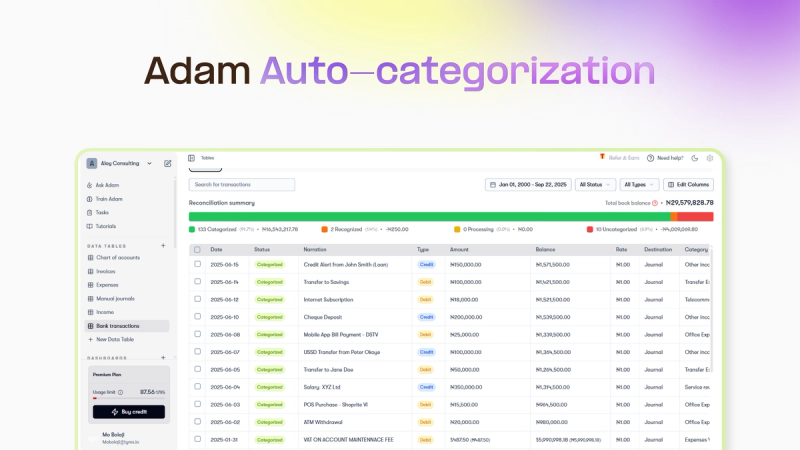
- Connect your bank account or upload a statement
- Transactions are imported automatically
- Set simple rules (e.g. “Seed Supplier” → Farm Inputs)
- The system learns and applies the rules going forward
- Generate financial reports with one click
This keeps your books consistent and reduces errors during tax season. Read more on auto-categorization with Adam by Tyms
Where Adam by Tyms Fits Best
Adam is a strong choice if you:
- Run a small or mid-sized farm in the US
- Want financial clarity without hiring a full-time bookkeeper
- Need reliable reports for lenders or accountants
- Prefer automation over manual bookkeeping
Potential limitations: Farms requiring deep agronomy or field-level analytics may prefer tools like Traction Ag.
Case Study: Faster Farm Financials for Loan Applications
A US-based agricultural specialist managing over 500 acres used Adam by Tyms to prepare financials for a loan application. After connecting his bank accounts and setting basic categorization rules, Adam generated his profit and loss statement and balance sheet in minutes.
Result:
He reduced bookkeeping time by over 80% and secured financing faster with audit-ready reports.
How to Choose the Right Farm Accounting Software (US Farmers)
When comparing options, focus on:
- IRS-ready financial reports
- Automation vs manual entry
- Support for seasonal income and expenses
- Ease of use for non-accountants
- Ability to scale as your farm grows
The best software is the one that saves you the most time while keeping your finances accurate.
Frequently Asked Questions About Farm Accounting Software
What accounting software do most US farmers use?
Many US farmers use QuickBooks, Traction Ag, and increasingly farm-specific accounting software that automates categorization and reporting. The right choice depends on farm size and workflow.
What is the best farm accounting software in 2025?
For most small to mid-sized US farms, Adam by Tyms is the best option due to its automation, speed, and ease of use. Larger farms may prefer tools like Traction Ag.
Is QuickBooks good for farm accounting?
QuickBooks works well for farms managed closely with accountants but often requires manual setup and ongoing categorization.
What accounting software is best for small farms?
Small farms benefit most from automated, easy-to-use tools. Options like Adam by Tyms, Xero, and Wave are commonly used.
Can farm accounting software help with loans and grants?
Yes. Most tools generate profit and loss statements, balance sheets, and cash flow reports required for loans, grants, and USDA programs.
Is farm accounting software tax-ready for the IRS?
Most reputable tools used by US farmers support IRS-ready reporting when set up correctly. Automation helps reduce errors during tax season.
How much does farm accounting software cost?
Prices range from free tools to $100+ per month. The best option balances cost with automation and time saved.
Final Recommendation
Choosing the right farm accounting software is about more than tracking numbers . It’s about saving time, reducing stress, and making better financial decisions.
For US farmers who want automated bookkeeping, fast reports, and minimal manual work, Adam by Tyms is the best farm accounting software in 2025.
You can also read:

How to Catch Up on Bookkeeping (Without Hiring an Expensive Service)
Many small businesses search for catch up bookkeeping software when they want to fix overdue records without hiring a service.
Temitope Ayegbusi
Jan 14, 2026
QuickBooks Pricing 2025: Full Breakdown and a Better Alternative That Saves You Hours
If you’re still comparing options or want to understand QuickBooks pricing in 2025, see our full breakdown of QuickBooks pricing and alternatives
Temitope Ayegbusi
Dec 15, 2025